In Xtremepush Loyalty, you configure loyalty features such as quests, reward rules, and achievements. When users complete them, they earn rewards. Tokens are one type of reward they can earn.
Every token a user holds but has not spent is a liability, because you owe the user what that token is worth. Your liability goes down each time tokens leave a user's balance. For more information, see Calculate your Loyalty Economy.
Tokens leave a user's balance in three ways:
Users collect tokens and spend them on redeem options, which are the prizes you offer in exchange for tokens, such as internal rewards, a cash payout, or a physical or digital item. Users can also spend tokens outside the widget, for example in your own shop, through your integration.
Tokens expire after a number of days, if you set an expiry on the reward that gave them.
An admin removes tokens from a user, for example to correct a reward given by mistake.
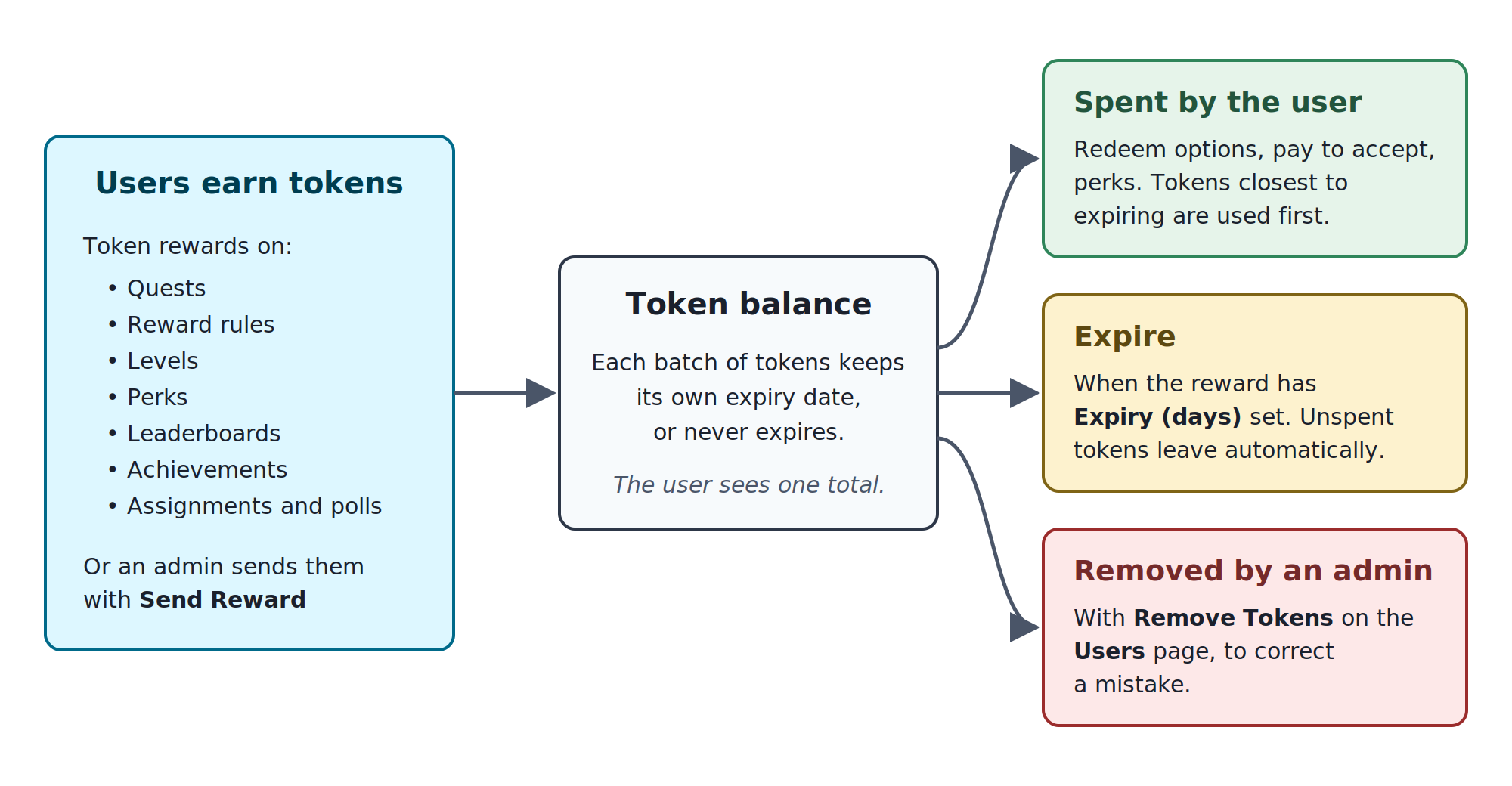
Users can see their token balance in the widget. Changes to the balance appear on the user's Balance History page, except removals you choose to hide.
Token spending, expiry, and removal
Spending
A user spends tokens when they exchange tokens for a redeem option, pay to accept a quest, or upgrade a perk. Your website or app can also charge tokens from a user through your integration, for example when the user spends tokens in your own shop. The amount spent is taken off the user's token balance. If the user holds tokens that could expire, see Expiry for the order in which tokens are spent.
Spending through your integration
Your website or app can take tokens from a user with the Charge user tokens API. Use it when users spend tokens outside the loyalty widget, for example in your own shop.
The request uses the user's own token, like the widget does. It charges only that user.
Enter the number of tokens in
amountand why you are charging them inreason. You can add your own reference intransactionId.If the user does not have enough tokens, the request fails and no tokens are taken.
A Balance Adjustment entry shows the charged amount as a negative number on the user's Balance History. You cannot hide it.
Each charge sends a
USER_CHARGE_COMPLETEDevent, so quests and reward rules that use this event are triggered.Each request charges the user, even if you send the same
transactionIdtwice. Make sure your integration does not send a charge again after it has already succeeded.
Expiry
To make tokens expire, set Expiry (days) on a Token reward. The field is under Amount and takes a whole number of days from 1 to 365. Leave it empty if you do not want the tokens from that loyalty feature to expire.
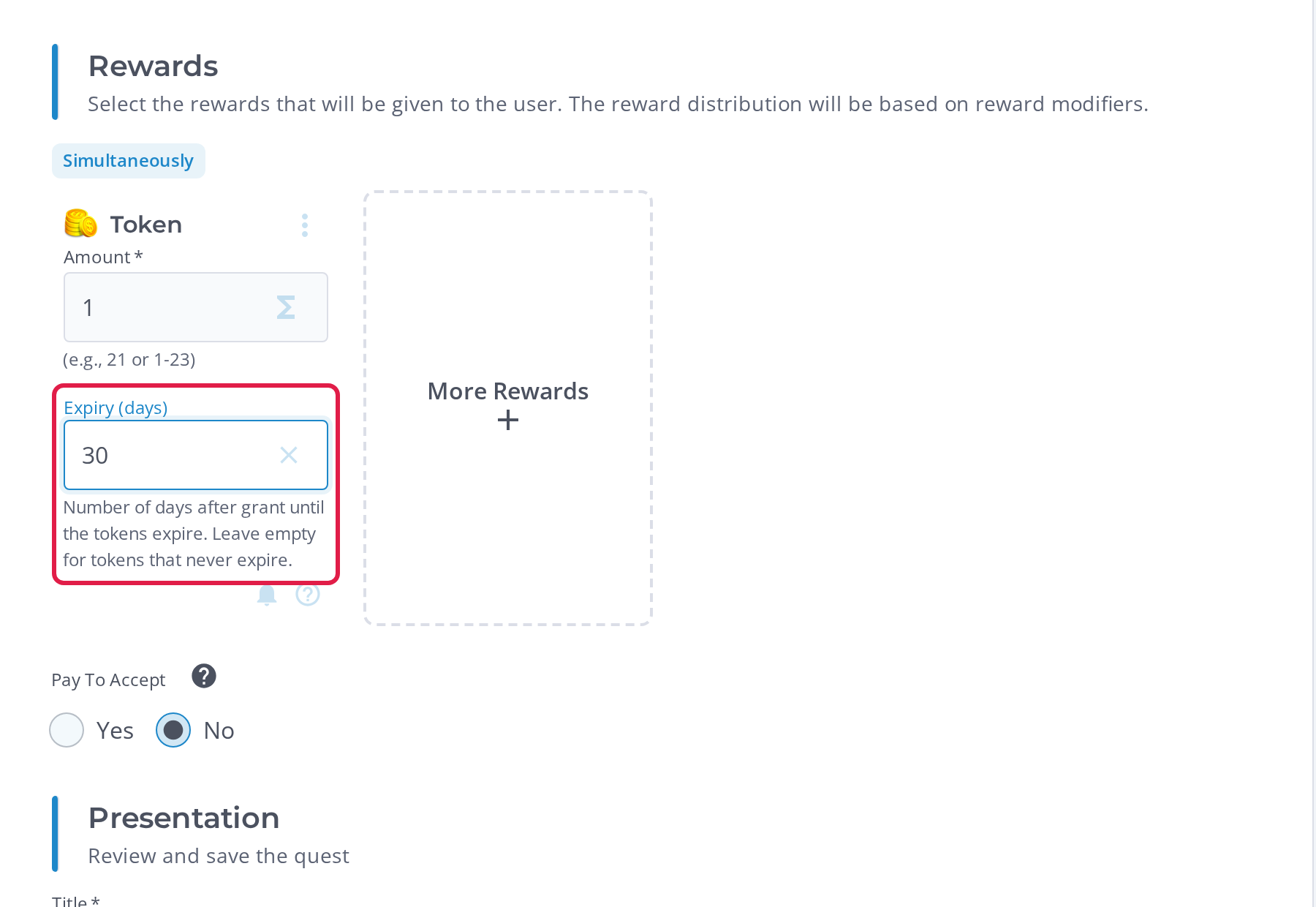
The expiry date is set when the user receives the tokens. It is the date the user received them (UTC) plus the number of days you enter. For example, if a user receives 100 tokens on November 3 and Expiry (days) is 7, the user can spend them until the end of November 9. The tokens leave the balance at 00:00 UTC on November 10.
Tokens with different expiry dates
Each batch of tokens a user receives keeps its own expiry date, or never expires. For example, a user can hold 100 tokens that expire on November 10, 50 tokens that expire on December 1, and 200 tokens that never expire. The user sees one balance of 350 tokens.
Tokens are not spent in random order. When a user spends tokens, the tokens closest to expiring are used first. Tokens that never expire are used last. The user only sees their total balance, not which tokens are used. For example, the user above redeems an option that costs 120 tokens. The 120 tokens come from the 100 tokens that expire on November 10, then 20 of the tokens that expire on December 1. The user keeps 30 tokens that expire on December 1 and 200 tokens that never expire.
Keep the following in mind when you use expiry
Expiry only applies to tokens users receive after you set it. Tokens users received before Loyalty 2.25.0, or before you set an expiry on that reward, never expire.
Changing the number of days does not change the expiry date of tokens users already hold. For example, a quest reward has Expiry (days) set to
30, and on November 5 you change it to7. Tokens a user earned from the quest on November 1 still leave the balance on December 1. Tokens users earn from November 5 onwards expire after 7 days.Expiry limits how many tokens a user can save. If a user cannot earn enough tokens for a reward before their oldest tokens expire, they can never redeem that reward. Before you set an expiry, check your redeem option prices against it. See Calculate your Loyalty Economy.
Expired tokens leave the balance automatically, so the token balance in the widget never includes them. On the user's Balance History, a Balance Updated entry shows the expired amount as a negative number, as shown below:
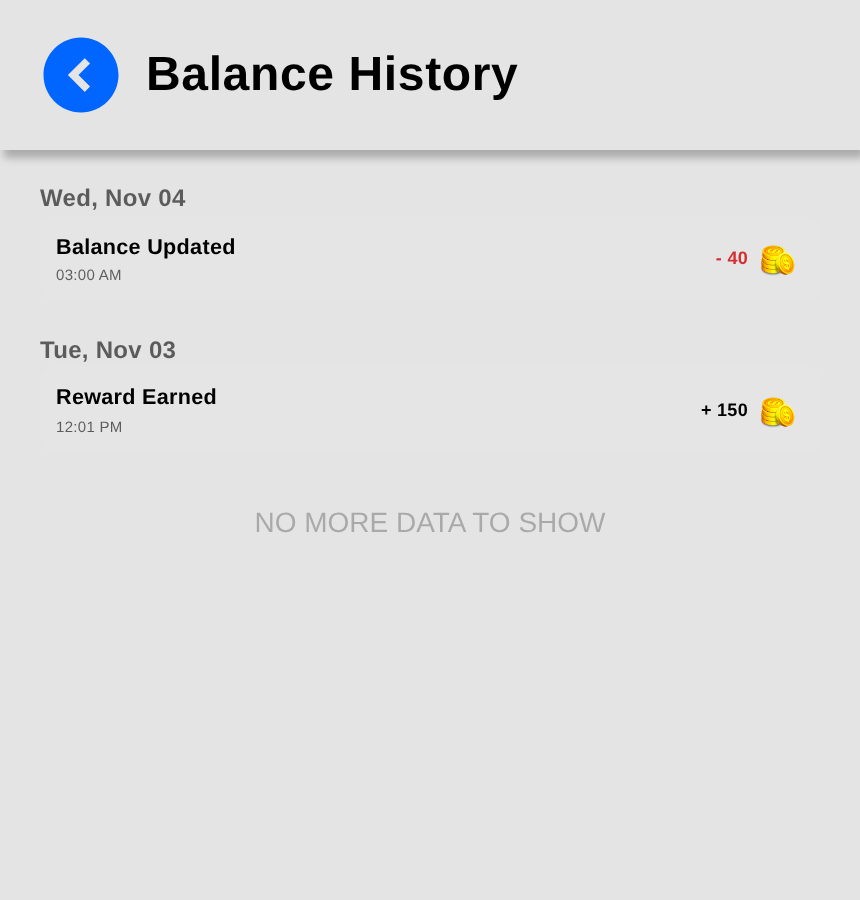
Expired tokens cannot be spent from 00:00 UTC on the day they expire, but the Balance Updated entry and the BALANCE_CHANGED webhook only appear at about 03:00 UTC.
Tell users when their tokens expire
The widget does not show expiry dates or warn users before their tokens expire. If you use expiry, tell users about it in your own content, for example in the quest description or on a How it Works page.
Removal by an admin
You can remove tokens from a user to correct a mistake. For example, a user may have received the same reward twice, or an admin may have sent tokens to the wrong user with Send Reward.
To remove tokens from a user:
Go to Users > All Users, select the ... menu on the user's row, then select Remove Tokens.
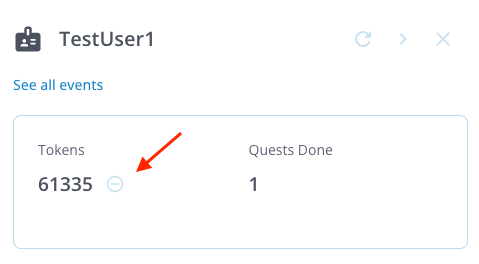
You can also open the user's side panel and select the minus icon next to Tokens as shown below:
In Amount, enter the number of tokens to remove. Select Max to remove the whole balance.
In Reason (internal), enter why you are removing the tokens. The user never sees this.
Choose whether the user sees the removal:
Show it: Leave Hide from player's Balance History unticked. A Balance Adjustment entry appears on the user's Balance History, showing the removed amount as a negative number. Optionally, enter a Message to player to explain the removal. The user sees it in the entry's details, as shown in the example image below:
.png?sv=2026-02-06&spr=https&st=2026-11-11T14%3A45%3A40Z&se=2026-11-11T15%3A00%3A40Z&sr=c&sp=r&sig=bv8ZSNrrf0rJ0OiKpIz5jc0YSxX4%2BZDuTljyrtVseus%3D)
Hide it: Select Hide from player's Balance History. The balance still goes down, but no entry appears on the user's Balance History.
Select Remove Tokens. The tokens are removed straight away, with no second confirmation. Refresh the page to see the new balance.
Keep the following in mind when you remove tokens
You can remove tokens from one user at a time.
You cannot remove more tokens than the user holds, so a balance never goes below zero.
A removal is permanent. To give the tokens back, send them to the user with Send Reward.
A removal takes the tokens closest to expiring first, the same as spending.
Each removal sends a
USER_CHARGE_COMPLETEDevent, so quests and reward rules that use this event are triggered.