2.26.0 and 2.27.0
21 and 23 October 2026
🚀 What's new?
Remove tokens from a user
You can now remove tokens from a single user, for example to correct a reward given by mistake. A removal is irreversible. For more information, see Understanding loyalty tokens.
Leaderboard results through the API
You can now fetch a leaderboard's cycles, both the current one and the saved past ones, and the full ranked results of any cycle (position, score and tier for every participant). See the API references here:
☀️2.25.0
16 October 2026
🚀 What's new?
Token expiry
You can now make tokens expire a set number of days after a user receives them, using the new Expiry (days) field on a Token reward. Expired tokens leave the user's balance automatically. For more information, see Understanding loyalty tokens.
☀️ What's Improved?
When a rotating leaderboard moves to its next cycle, the final results of the cycle that ended are now saved. For more information, see Configure Leaderboards.
The Leaderboards list now has an Ends At column that shows each leaderboard's end date.
In the Loyalty Hub, you can now upload images of any size for your loyalty features, such as quest icons. The upload area shows the recommended size, and the widget shows images in proportion without stretching them.
If one section of the widget fails to load, only that section shows an error with a Try again option. The rest of the widget keeps working.
🔧 What's Fixed?
Fixed an issue where special characters such as
&or<in titles showed as code in the widget's activity details.
2.24.0
9 October 2026
☀️ What's Improved?
Users who opt in to a rotating leaderboard now stay in for every following cycle, so they no longer need to opt in after each rotation. Everyone who took part in a cycle is carried into the next one, with or without opt-in, and appears in the ranking from the start of the new cycle.
Description is optional again for quests and redeem options, so you can save quests and redeem options that have no description.
Liquid Blocks in the widget now keep what a user has typed or selected in a form when the block refreshes. Content safety checks for Liquid Blocks are also stricter.
Liquid Blocks are not available on every project. Reach out to your Account Manager if you want them enabled on your project.
🔧 What's Fixed?
Fixed an issue where a level-up, segment change or quest progress could be missed when an event arrived straight after a change to the user's data.
2.23.0
7 October 2026
🚀 What's new?
Register users when they first open your widget
You now have the option to add users to your Loyalty Hub only when they first open your widget, rather than as soon as Xtremepush receives an event for them, such as a bet or deposit. For more information, see User Profiles under Prerequisites.
This feature is not available on every project. Reach out to your Account Manager if you want this enabled on your project.
Promotion External ID
The player and admin promotion APIs now return each promotion’s
externalId, so you can match promotions to bonuses in your own system.
☀️ What's Improved?
Description and code fields in the Loyalty Hub now use a new editor that keeps the cursor in the correct place. It also adds syntax highlighting, line wrap, and a copy button.
The leaderboard Participation step is now called User requirements.
🔧 What's Fixed?
Fixed an issue where some events failed to process during periods of high event volume. This delayed quest progress, rewards, and statistics until the events were retried.
Fixed an issue where quest progress could reset because of an event for a different challenge or a repeated event.
Fixed an issue where the event that added a user to a leaderboard without opt-in did not count towards their score.
Fixed an issue where a user could accept or claim another user’s assignment through the API.
Fixed an issue where long quest titles without spaces did not wrap and pushed the quest list out of the widget.
2.22.0
26 September 2026
☀️ What's Improved?
In dynamic rewards, the widget now shows each user the amount they will receive. This applies to quests, level rewards, the daily bonus, and redeem options. For more information, see Dynamic Rewards.
You can now use three new operators in text conditions, such as in segment, quest, and reward rule requirements:
not one of
not matches all
not matches any
Use these to exclude values, for example to target users whose tier is not one of gold or platinum.
🔧 What's Fixed?
Fixed an issue where entries in the Inventory Activity list in the widget could not be opened.
Fixed an issue where creating a new loyalty user sent their existing Xtremepush profile attributes back to Xtremepush as update.
2.21.0
18 September 2026
☀️ What's Improved?
Widget components that use dynamic values, such as the iFrame component, now wait until the user’s details have loaded before they display. Previously, an iFrame could start loading before the user’s details were available, then reload once they were.
When you save a quest challenge or a leaderboard, Xtremepush now checks that its progress settings are complete. If a require value is missing, you cannot save and the error shows what is missing. Previously, these could save without an error but never progress. This does not affect existing challenges and leaderboards until you edit and save them.
🔧 What's Fixed?
Fixed an issue where selecting Claim more than once could pay out a reward multiple times. This also applied to assignments, daily bonuses, achievements, and token transactions.
Fixed an issue where users could start or cancel a quest outside its scheduled window by working around the widget.
Fixed an issue where Promotion rewards could lose their settings when saved while the promotion list was still loading. Rewards already affected must be configured again.
Fixed an issue where the Total Rewards Redeemed value on a user's profile incorrectly included the number of redemptions.
Fixed an issue where negative conditions on list attributes, such as contains none of the elements, did not match users with an empty list.
2.20.0
11 September 2026
☀️ What's Improved?
Saving a change in leaderboards and other admin areas now sends a tracked event via webhook.
🔧 What's Fixed?
Scheduled quests can no longer be seen or started outside their window. This applies to all unaccepted quests. If a user accepted a quest outside its scheduled dates, the quest remains with the user.
Duplicating a leaderboard now correctly reports success instead of an error.
A failed segment refresh no longer silently stops without a record. Failures are now logged, and one failing segment doesn't block the rest of the sync.
2.19.0
2 September 2026
🚀 What's new?
Embed external content in widget pages
You can now iFrame external content within your loyalty widget using the iFrame component under Widget > Customize. The frame's address supports templating, so you can pass the viewer's context into the embedded page, and its permissions are limited to only what you explicitly grant it.
☀️ What's Improved?
Widgets can now interpolate
{{ user.id }}to reference the current user's ID.
2.18.0
31 August 2026
🚀 What's new?
You can now set a quest to start automatically when a user triggers the quest, so users do not need to accept it first. To enable this, use the Start this quest automatically on first matching event toggle under quest restrictions. For more information, see Configure Quests.
This toggle is not only available on every project. Reach out to your Account Manager if you want this feature enabled on your project.
☀️ What's Improved?
Quest challenge setup now shows each challenge as its own collapsible card with a progress summary, instead of one long list of fields.
2.17.0
25 August 2026
🚀 What's new?
Loyalty Dashboard
A loyalty dashboard is now available which gives you an overview of your entire loyalty solution, including your total users, loyalty features you’ve configured, your user’s transactions and more. For more information, see View Loyalty Dashboard.
Token Balance available as attribute
A user's current token balance is now available as a loyalty system attribute. You can build rules, segments, quests and other loyalty features based on how many tokens a single user holds. For more information on loyalty system attributes, see Manage Loyalty Attributes.
☀️ What's Improved?
Leaving the widget editor with unpublished or unsaved changes now asks you to confirm before you leave, whether you're navigating elsewhere in the Loyalty Hub or closing the tab.
Opening the preview for an app with no widget configured used to send you to the widget configuration list to set one up. It now creates and publishes the default widget for you directly, and the preview refreshes in place with the new widget visible.
2.16.0
21 August 2026
☀️ What's Improved?
In the widget Preview tab, you can now immediately preview the widget without selecting a user in the Configuration section.
In the widget Customize tab, the widget pages now have an arrow (right when closed, down when open) to improve navigation.
🔧 What's Fixed?
Fixed an issue where accepted quests weren't recorded, so any loyalty feature or segment that was based on a users accepting a quest was not updated. Quests accepted before this fix remain unrecorded.
Fixed an issue where a single malformed attribute update could stall loyalty attribute updates for an entire project.
Fixed an issue where Redeem Option Group tiles grew oversized on tablet and desktop instead of fitting more tiles per row.
2.15.0
12 August 2026
🚀 What's new?
Additional Widget Components
In the loyalty widget, you can now add the following components under Widget > Customize:
Background: Allows you to add a background image to your widget.
Level Summary: Displays the users current level with supporting content and a destination link.
Spoiler: A container you can add for short text you want to show collapsed by default, such as FAQs.
Redeem Options Group: Adds a tile for each redeem group, which includes its available redeem options. Selecting a tile takes the player into that group. A tile only shows as locked when every option inside it is unavailable for that player.
Liquid templating in Widget
Under Widget > Customize, you can now add Freeform Liquid templates using a new LiquidBlock component, with optional scoped CSS. This option is not available in all projects, please reach out to your Account manager to get this enabled on your project.
☀️ What's Improved?
The following new properties have been added to existing widget components: BalanceSection, UserStats, GameRules, ActiveAchievements, QuestList, QuestBox, RedeemOptionsList, PageHeader, and LevelTitle.
You can now use Custom Expression in a quest’s Progress Counter to define how quest progression is calculated. See Configure Quests for more information.
The Review option for a created leaderboard has been renamed to Edit.
🔧 What's Fixed?
Fixed an issue where the widget could display partial content before user attributes had loaded. The widget now waits for user attributes to load before it displays content.
2.13.0
4 August 2026
🔧 What's Fixed?
The leaderboard component now restricts display name length so an unusually long name can no longer disrupt the layout.
When a referenced attribute value is missing, the widget now shows a default value instead of the raw
{{ }}template path.Fixed an issue where recurring quests could get stuck at 100% progress and fail to reset for the next cycle.
2.12.0
24 July 2026
☀️ What's Improved?
The
levelConfigCreated,levelConfigUpdated, andlevelConfigDeletedwebhooks now include alevelfield in every event body, removing ambiguity for integrations that rely on a stable level identifier.
🔧 What's Fixed?
Fixed a crash on the Redeem > Transactions page that occurred after deleting a redeem option that had associated transactions.
Fixed a race condition that could leave some redeem transactions using the internal rewards provider permanently stuck in "pending" status.
Redeem option statistics now work correctly for redeem options using the internal rewards provider, instead of returning an error.
The
USER_CREATEDevent now fires correctly for users auto-created via inbound events, not just those created through the widget.
2.11.0
20 July 2026
☀️ What's Improved?
When configuring a quest, you can now set a custom completion duration in hours or days using free-form input, instead of choosing from a limited dropdown. This allows more precise deadline control (for example, 4 hours, 8 hours, or 16 days).
Promotions now support flexible, typed parameters instead of being limited to a single amount field, including duration and any custom fields configured in XP.
🔧 What's Fixed?
Fixed an issue where the widget's default language wasn't applied automatically
Fixed two widget countdown display issues: durations no longer round down by one unit (for example, a 2-day duration now correctly shows "2d" instead of "1d"), and mixed durations now show all time units (for example, "2h 30m" instead of just "2h").
Fixed an issue where Markdown fields containing only a link displayed broken markup instead of rendering correctly.
2.10.0
13 July 2026
☀️ What's Improved?
In the Widget Editor (under Widget > Customize), the User Level component now supports the following properties:
hideAllLevels: Prevents users from seeing all levels in your loyalty solution.
maxLevelBehaviour: Controls what a user who has reached the max level sees. This dropdown has three options:
hide: Nothing is displayed to users who reach your highest configured level.show-message: Shows a "Max Level Reached" message when a user reaches your highest configured level.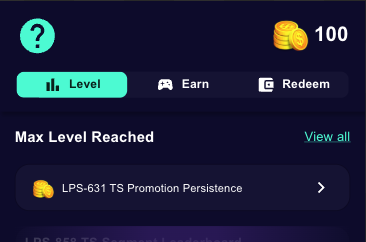
show-level: Shows the user's level when they reach your highest configured level, instead of the “Max Level Reached” message.
SF Pro font is now available as a font option for widget styling.
🔧 What's Fixed?
Fixed an issue where Markdown links inside widget element descriptions didn't consistently trigger a redirect on the first click. Links now respond immediately on the first tap.
Fixed a bug where duplicating a WYSIWYG component reused the same internal ID for both copies, causing edits on one to unintentionally affect the other. Duplicated components now receive unique identifiers and operate independently.
2.9.0
6 July 2026
🚀 What's new?
Scheduled attribute automations
Attribute automations can now trigger on a cron schedule in addition to an event, so you can reset or recalculate an attribute value on a recurring basis without relying on a scheduled event. For more information, see Add Attribute Automations.Internal Reward Redeem Option
You can now create a redeem option that uses your existing reward types, such as quests, game elements, or promotions, as what a user redeems their tokens for, fulfilled directly by Xtremepush without a third-party integration or webhook. For more information, see Configure an Internal Reward Redeem Option.
☀️ What's Improved?
WYSIWYG page components now expose their component IDs as HTML
idattributes, making them easier to target with custom CSS or scripts.
🔧 What's Fixed?
Fixed an issue where admin endpoints could become frozen, requiring a full deployment restart.
Fixed an issue where segment counts weren't calculated for users with pre-existing boolean attribute values.
Fixed an issue where the leaderboard "not available" message couldn't be hidden; it's now optional via a widget prop.
2.8.0
24 June 2026
☀️ What's Improved?
You can now show or hide the leaderboard footer, which displays the rotation time and a Learn more link to view rewards.
The widget editor now shows a preview image for each leaderboard component when you select it.
Removed the duplicate-event notification from the admin panel and the Event ID field from the Send Event form.
🔧 What's Fixed?
Fixed multiple issues that could prevent quest and perk rewards from being applied correctly.
Fixed an issue where leaderboards weren't fetched for admins when the leaderboard was disabled.
2.7.0
10 June 2026
☀️ What's Improved?
For any leaderboard widget component, only the most most upcoming date is displayed. For example, if a Leaderboard has not started, only the start date would be shown, and not the rotation or end date.
🔧 What's Fixed?
Fixed an issue where a leaderboard continued distributing rewards after its end date had passed.
Fixed an issue where an infinite rotation period ("until completion") couldn't be set for a leaderboard.
Fixed an issue where a leaderboard's first rotation period was calculated incorrectly.
Fixed an issue where the leaderboard summary showed the next rotation date instead of the start date.
2.6.0
7 June 2026
🚀 What's new?
Translations in Widget Editor
You can now manage translations directly in the widget editor. You can also manually edit these translated values. For more information, see Translations in Widget Appearance.
2.5.0
29 May 2026
🚀 What's new?
Additional Leaderboard Components
In the loyalty widget, you can now add the following components under Widget > Customize:
Active Leaderboards: This displays the list of active leaderboards on your widget in preview card format.
Leaderboard Summary: Preview card for a single leaderboard that displays information such as leaderboard title, description and more.
Leaderboard Timer: Countdown timer for when a leaderboard ends or rotates
Leaderboard Rewards: Displays the rewards for each position on the leaderboardd.
For more information on widget components, see Widget Layout.
Dynamic content in WYSIWYG pages
In the Widget editor, component properties now support {{ }} syntax to pull in dynamic content from user attributes and interaction events. Pages also support URL route parameters, query parameters, and hash values, enabling list-to-detail page navigation.
☀️ What's Improved?
WYSIWYG pages now support a
stylingproperties withnoneorpageoptions, letting you control the padding around a page's content. This is used in the widget's editor.
🔧 What's Fixed?
Fixed an issue where user attribute interpolation in widget component properties didn't resolve, causing a 500 error on the leaderboard component.
Fixed an issue where an expired leaderboard was still displayed as active, with opt-in still available.
Fixed an issue where
{{ page.query.q }}didn't resolve correctly on the widget URL.Fixed an issue where the browser tab title showed "undefined" for standalone widget URLs.
Fixed an issue where the quest summary showed success even when a paid quest's acceptance failed.
Fixed an issue where the quest summary didn't display the participation cost before a user accepted the quest.
2.4.0
21 May 2026
🚀 What's new?
Tournaments
You can now configure Tournaments, which time-bound competitions to rank and reward your users. For more information on Tournaments and how to configure them, see Tournaments.
Markdown support for Game Elements
Quest, achievement, and poll descriptions now support Markdown so you can present richer content to your users in the widget.Attribute-based leaderboard progress
Leaderboards can now rank users by user attribute values in addition to event counts. This enables leaderboards based on lifetime totals, current level, or any custom user attribute.
🔧 What's Fixed?
Leaderboards reflect events and attribute updates, including accumulative-by-event-field, +1 with every event, and user-attribute-value.
Level progression now recalculates correctly for integer-typed attributes.
Widget redemption no longer fails with a
404when completing a redeem.